【Language Settings】
(1) Go to Settings (設定) > System (システム).
(2) Select Language (言語) and choose your preferred language.
【How to Check the SSID and Password】
(1) Power On: Press and hold the power button for at least 3 second.
(2) Enter Settings: On the home screen, ensure the Settings (設定メニュー) icon is selected, then press the ENTER button on the side.
(3) Select Wi-Fi: Press the SELECT button to highlight Wireless LAN (無線LAN/Wi-Fi) and press ENTER.
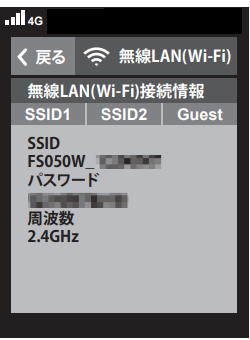
(4) View Info: Press the SELECT button to highlight Wi-Fi Connection Info (無線LAN接続情報) and press ENTER.
(5) Confirmation: The SSID and Password will be displayed.
Note: By default, the 2.4 GHz band SSID is shown. To use the 5 GHz band, you must enable it in the settings beforehand.