This guide applies only to devices with a management number starting with "LG..." (found on the label on the back of the device).
f your device is not working properly, please try the following steps.
Note: Performing a reset will clear the data usage displayed on the screen back to "0."
<Restarting the Device>
Turn the power off, then turn it back on.
<Reinserting the Battery>
With the power turned off, remove the back cover and the battery, then reinsert them.
<Reinserting the SIM Card>
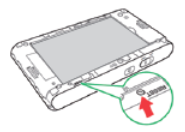
(1) Insert SIM tool: With the power turned off, insert the SIM tool into the small hole at the bottom of the device.
(2) Remove SIM tray: The SIM tray will eject, so please pull it out.
(3) Reinsert: Place the card facing the correct direction and reinsert the tray.
Note: If you do not have a SIM tool, you can use a thin, pointed object such as a needle.
<Resetting the Device>
(1) Power On: Turn the power on.
(2) Open Settings: Tap "Settings" (設定) on the menu screen.
(3) Select Reset: Tap "Reset" (リセット) at the bottom of the screen.
(4) Confirm Initialization: A message will appear asking, "Initialize to factory defaults. Are you sure?" (工場出荷の状態に初期化します。よろしいですか?). Select "Yes" (はい).
(5) Restart: The device will reset and restart automatically.
(6) Complete Setup: After the device restarts, press "OK" twice to complete the process.