This guide applies only to devices with a management number starting with "FC...","RA...",DM...", (found on the label on the back of the device).
If your device is not working properly, please try the following steps.
Note: Performing a reset will clear the data usage displayed on the screen back to "0." Please make a note of your data usage beforehand if necessary.
<Restarting the Device>
Turn the power off, then turn it back on.
<Reinserting the Battery>
With the power turned off, remove the back cover and the battery, then reinsert them.
<Reinserting the SIM Card>
(1) Remove the battery: With the power turned off, remove the back cover and the battery.
(2) Slide the metal latch: Press down and slide the silver metal latch.
(3) Reinsert: Remove the SIM card, then reinsert it.
Note: When reinserting, gently push the SIM card inward until it clicks to secure it in place.
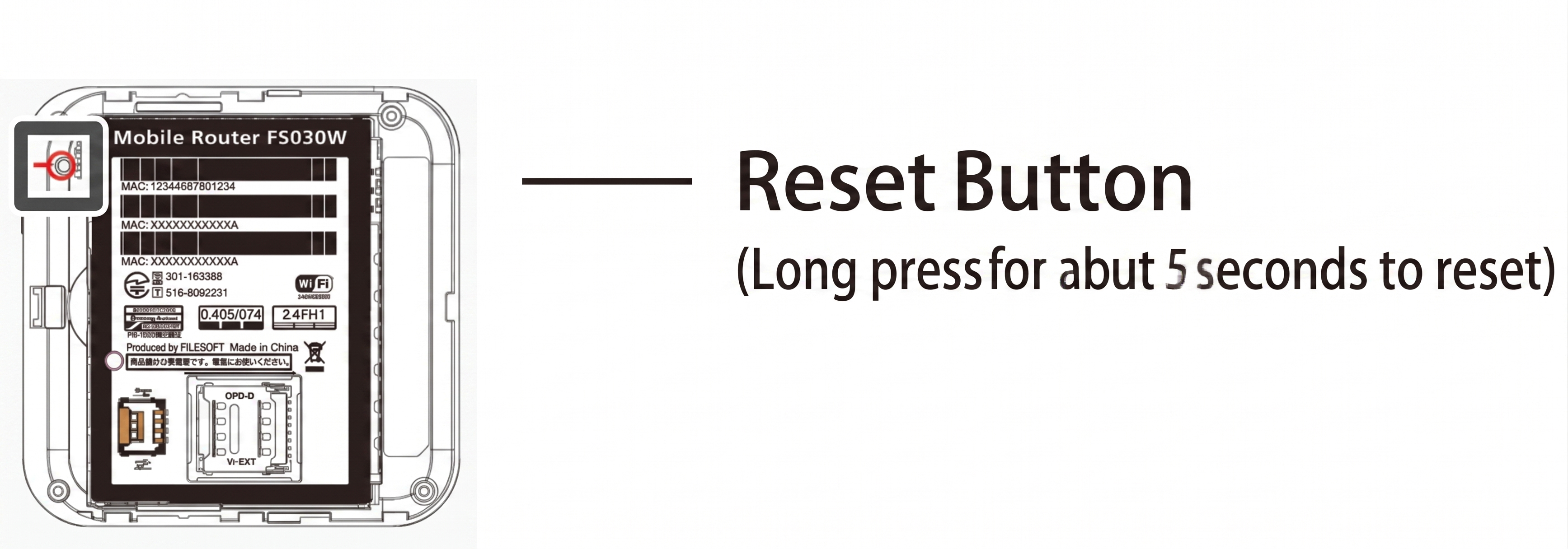
<Resetting the Device>
(1) Power On:With the power on, slide and remove the back cover.
(2) Press Reset Button:Press and hold the small button (Reset button) near the battery using a thin, pointed object like a needle for 5 seconds or more.
(3) Restart:The device will reset and restart automatically.