This guide applies only to devices with a management number starting with "FN..." (found on the label on the back of the device).
If your device is not working properly, please try the following steps.
Note::Performing a reset will clear the data usage displayed on the screen back to "0."
<Restarting the Device>
Turn the power off, then turn it back on.
<Reinserting the SIM Card>
(1) Remove SIM: With the power turned off, remove the cover labeled "Nano IC Card" on the top of the device, then push the SIM card in to release and remove it.
(2) Reinsert: Push the SIM card back into the slot, then securely close the cover.
<Resetting the Device>
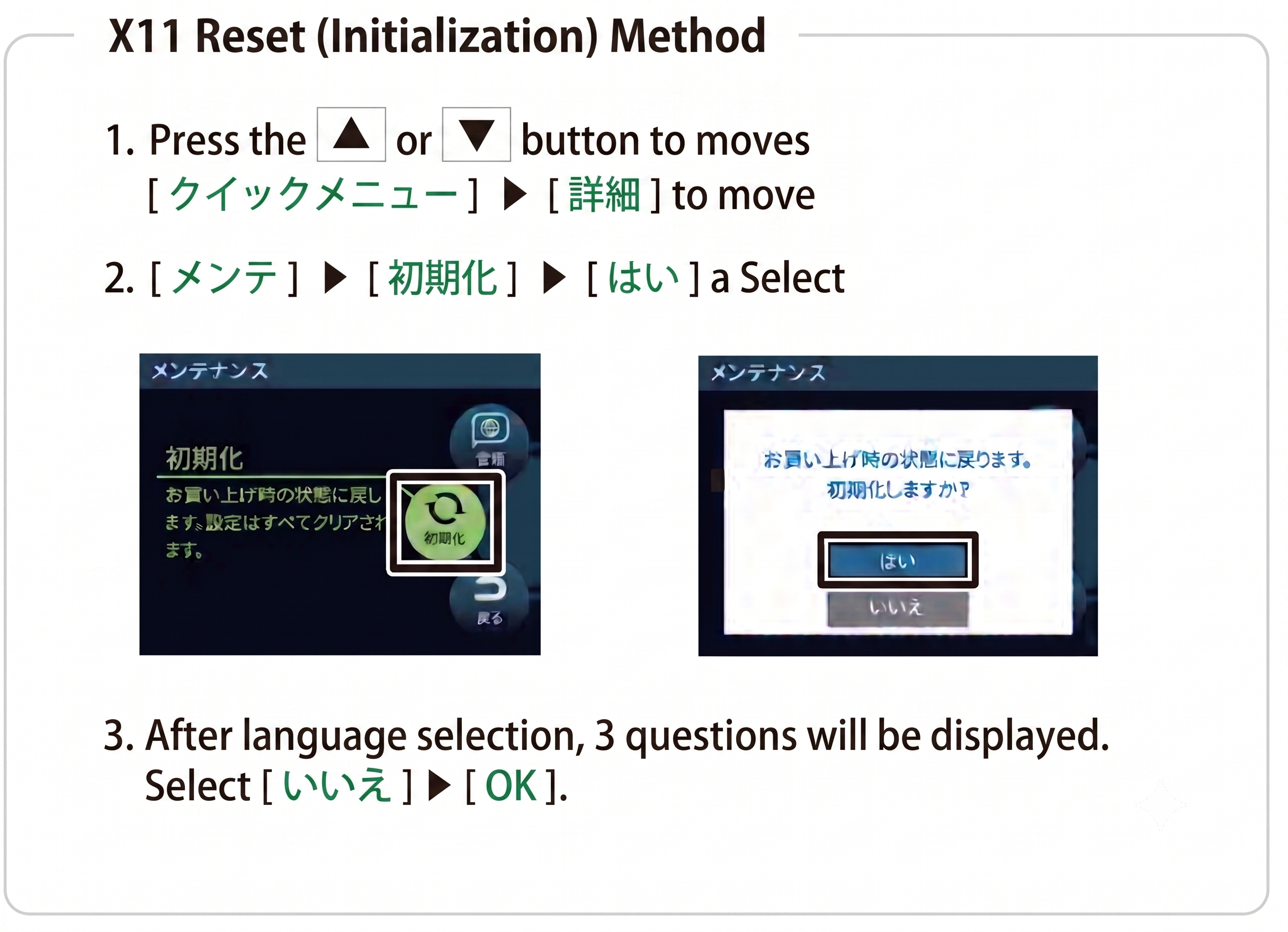
(1) Turn the power ON, press the ↑ or ↓ button, and select "Quick Menu.(クイックメニュー)"
(2) Select "Advanced,"(詳細設定) then select "Maintenance."(メンテナンス) (Press ↑ three times to display Advanced/Maintenance).
(3) A message will appear: "Selecting Initialization will restore the device to its factory default settings. Do you want to initialize?" (「初期化を選択すると、本機は工場出荷時の設定にリセットされます。初期化しますか?)Select "Yes."
(4) The device will be reset and automatically restart.