This guide applies to devices with a management number starting with "WH..." or "WG..." (found on the label on the back of the device).
Note:Performing a reset will clear the data usage displayed on the screen back to "0."
Please make a note of your data usage beforehand if necessary.
<Resetting the Device>
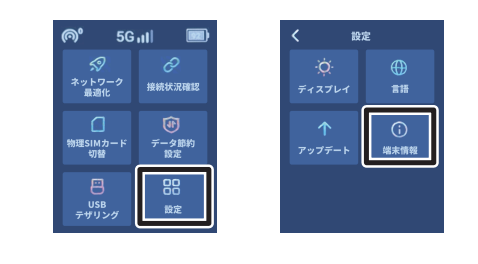
(1) Navigation:With the power on, swipe the screen to the right and go to Settings (設定) > Device Info (端末情報) > Reset (初期化する) > Yes (はい).
(2) Confirm Reset:When "Are you sure you want to reset?" appears, select Yes (はい) to begin the process.
(3) Language Setup:After the device restarts, the language settings will appear. Select Japanese (日本語) or your preferred language.
(4) Completion:The initialization is complete.
<How to Update>
(1) Navigation: Swipe the menu screen to the right and tap Settings (設定).
(2) Select Update: Tap Update (アップデート).
(3) Check for Update: Tap Check for Updates (チェックする).
<If Connection is Unstable>
(1) Network Optimization:Turn on the power, swipe the screen to the right, and select "Network Optimization" (ネットワーク最適化) > "Optimize Now" (今すぐ最適化します).
(2) Completion:The process will take approximately 1 to 2 minutes to complete.